Over the last three years Questlog focused mainly one one thing: Your Games. This definitely won’t change, there’s one thing though that made this focus a bit harder than necessary: Remembering games you might have played or finding new games based on what you’ve played – In short: Discovery.
This update of Questlog tries to address this. Initially I wanted to improve Onboarding but got heavily sidetracked. After adding a hero section for guest users on the home page I thought »Well, but what after they logged in? They should discover games!« So I added a trending section. That worked quite well but what after that? Yeah, recommendations would be great, right? So I built this.
Better Onboarding🔗
This one has still a long way before I would consider it as good. But it has made one big jump: It’s there. In a rudimentary form, but onboarding was a part that was always missing from Questlog and now – maybe – it’s more clear how to start.
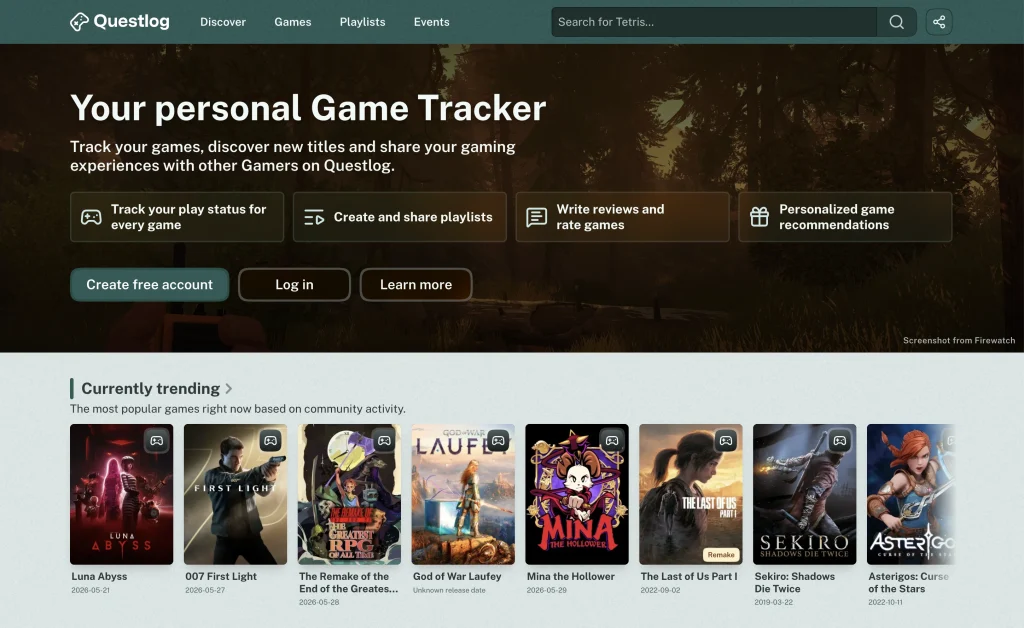
The home page for guests now has a section at the top quickly outlining what Questlog does. With big buttons for registration and login and a nice background image that’s a screenshot from a popular game. On all other pages the bar above the header still stands. But the big part comes after you firstly logged in.
There’s a new section on the home page nudging new users to log at least 10 games to unlock recommendations. A small progress bar is filling dynamically with every new game and after it’s full you can view your recommandations.
Recommendations are here🔗
These recommandations are available for every user of Questlog. So no matter if you logged 10 games or 1,000 (yeah I see you. There are some of you with over 1,000 games) you get recommendations based of these games.
These recommandations are mainly driven by the users of Questlog. If a game wasn’t logged, rated, reviewed or listed by any user, it won’t be in your recommandations. So it’s not just a mash up of all “Similar Games” sections of every game page.
The recommandation engine tries to find similar games of what you’ve played and looks what other users with similar interests have played. It takes Status Logs, Reviews, Ratings and Playlists into account. Also the Relevancy Score of the last update is used a bit, but not too much, as it would be weird to prioritize popular games if you only play niche indie titles.
It’s quite hard to get this right but at least for my testing it worked okay. But if the recommendation engine isn’t perfect. It can’t be, I wrote it and well… let’s say it was quite hard as I just started writing more complex algorithms. It worked for Similar Games and the Recommendation Engine though and also for the new Trending Games Section, so I tried.
As there definitely will be games in there you don’t want to play, you can hide them from your recommendations. They will be removed and if you chose this for more and more similar games this should spread a bit. So if you get Call of Duty for some reason there even you never played a “realistic” shooter and remove it then less games like that should appear. The more you remove games of the same genre and theme, the less these should appear.
Discover new Games🔗
We now have trending games and recommended games. So the home page seemed a bit messy. We already had 4 game groups there and they where just “Stuff happens” and “All users did this” groups. Recent Releses, Most played games etc.
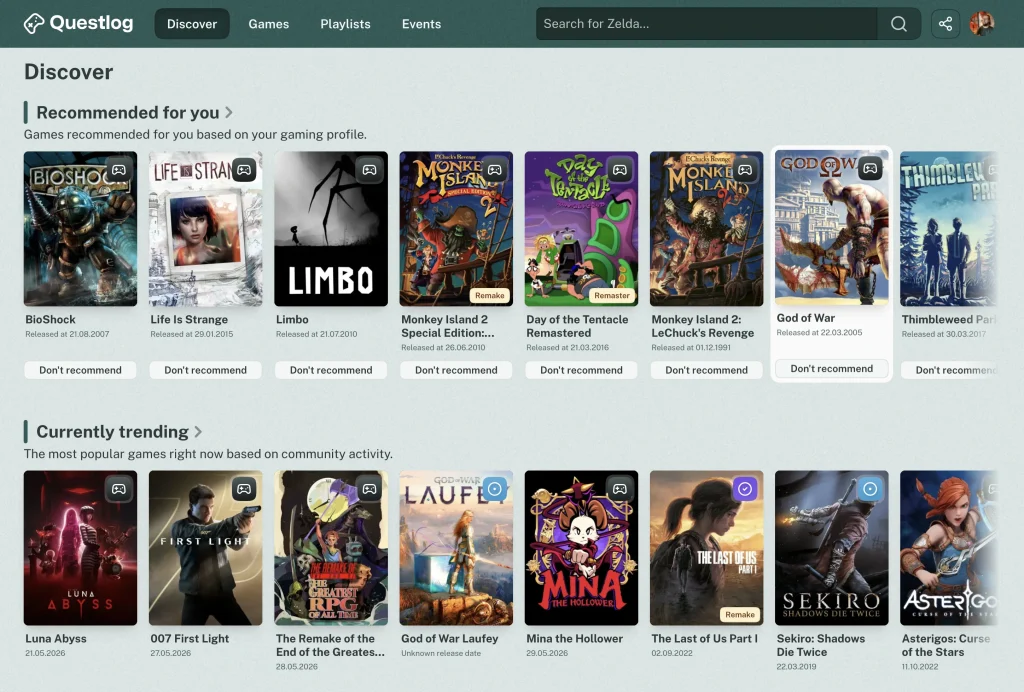
I started to make a Discover page to group all these things and then I was dissatisfied for a while. I moved stuff around, created new stuff, deleted the created stuff and slept over it. Now the structure of Questlog changed.
You’ll see this directly in the Header. The navigation changed. Reviews are gone and Discover is new. Also the Games link doesn’t link to the games index anymore. But no worries, every page is still there. In the footer every link is still available directly in the Directories section. Also there are some quick links here and there on the discovery pages.
If you click on Discover you’ll see Games, Events, Playlists and Reviews. It looks a bit like the old home page, but a bit richer. The Discover Games Page is completely focused on games so you see more stuff around that.
There’s still a bit work to do. Playlist, Events and Reviews don’t have their own Discover pages yet, but these will come too eventually. But I worked on this update for about a months and I need feedback. Well, and I want to use the recommendations with my own account 😀
Hide Games🔗
Sometimes there are games you just don’t want to see. You can hide them from the Recommendations, but they will be there in Playlists, Reviews, searches etc. Maybe they’re even trending.
As this can be annoying and can be a deal breaker if a games actually offends you or it hurts to see them because of some personal reason you can now hide these games. They will be gone from everywhere with one small exception.
As Playlists are highly curated lists from Questlog’s users I didn’t want to tear them apart. So if you open a Playlist with a game you’ve hidden before the spot is filled but the game is blurred. You can still hover it to see what game it was. I thing that’s a good way around.
You can still access these games directly if you have the link and can remove a game from the hidden games status from there. There’s also a link in the footer to manage your hidden games. This will be placed a bit better in one of the next updates where I want to introduce better settings.
Personalized home page🔗
The home page got an overhaul and also completely new sections. The page starts with a section to start your next game. Directly from you Want to Play status so you maybe see something you wanted to start, without digging down the pages.
Then you’ll see the recommendations, that follow you throughout the discovery pages. Followed by games you already play (similar to the first section) and games you want to play that just got released.
To get you into a game you want to play but weren’t sure yet there’s also a section with reviews to games you still want to play.
And for all the games you already finished there’s a section at the end to rate games you finished or abandoned. As these ratings will improve your recommendations I can only recommend (no pun intended) you to use this feature.
Not done yet🔗
As I mentioned, I want to do some more stuff with the discovery label. Discover pages for Playlists, Events and Reviews will definitely come.
But one big feature is in my mind in terms of personalization. The new home page is something I think would fit the Users of Questlog well. But… I have no statistics. I don’t track what you’re doing. So it would be much better to give you control over your home page.
I can’t promise that this will be in the next update, but I want to modulize every section on every Discover page and give you the option to add them to your home page in the order you want. This will be a bit work though. But that’s the goal.
The onboarding is still a part I want to improve and therefore I will spend time there too. One part will be benefiting you too: Preferred Platforms and Preferred Genres. When you first register at Questlog you’ll be asked in a future update what Platforms you have/prefer (not sure yet) and the same for Genres. This will affect Recommendations. As a PlayStation Player a Recommendation for a Switch Game can be annoying. So this should be part of the Recommendation engine.
So, this was much. I would like to hear from you on Mastodon, what you would like to see. Can be related to this update and also to something completely different. I make a note on every request and look into it.
Changelog🔗
As always here’s the unfiltered Changelog.
Features
- Recommandations
- Based on the games you played, rated or want to play you’ll get personalized Game Recommendations
- Dismiss Recommendations if a game isn’t your type
- Manage dismissed recommendations if you want to get a game back
- Dismissed games affect the recommendation algorithm — similar games receive a penalty in scoring
- Based on the games you played, rated or want to play you’ll get personalized Game Recommendations
- Dismiss Recommendations if a game isn’t your type
- Manage dismissed recommendations if you want to get a game back
- Dismissed games affect the recommendation algorithm — similar games receive a penalty in scoring
- New Discover section with dedicated pages for game discovery
- The Discover Index gives a broad overview of what’s happening on Questlog
- Discover Games shows trending, new releases, upcoming, and most wanted games
- Dedicated pages for Trending Games and Personal Recommendations
- It’s now possible to hide games
- Hidden games are hidden from everywhere with the exception of Playlists, where they are shown blurred so a Playlist doesn’t feel incomplete without an obvious reason
- An overview of all your hidden games is linked in the footer so you can quickly review your decisions
- Personalized home page for users with enough games logged
- Continue Playing, Next Up, Newly Available, and Unrated Games sections
- Added a hero section on the home page for guests to better explain what Questlog does
- Game lists throughout the app are now horizontal sliders
- Smooth fade at the edges indicates more content is available
Improvements
- New Section Headers
- Added descriptions to all section headers across the homepage, Discover Index, and Discover Games to make it clearer what each section shows
- Optimized the styling of section headers
- Replaced the “Games” link in the main navigation with the “Discover Games” page — the Games index is still in the footer and at the end of the Discover Games page
- Removed “Reviews” from the main navigation — the Reviews index is still in the footer
- Drastically reduced the payload of every request by ~75% through better caching between page changes
- Slightly softer drop shadows throughout the app for a more refined look
Fixes
- Game cards no longer trigger a navigation/click animation when a button inside them is clicked
- Fixed an issue where empty YouTube Playlists were linked on Events pages
- Fixed an issue where YouTube Playlist generation stopped completely due to a token refresh race condition
Accessibility
- Improved visual hierarchy through consistent section descriptions across multiple pages
- Optimized headline hierarchy and sizing across multiple pages